Claude Code: a quiet one-row status line
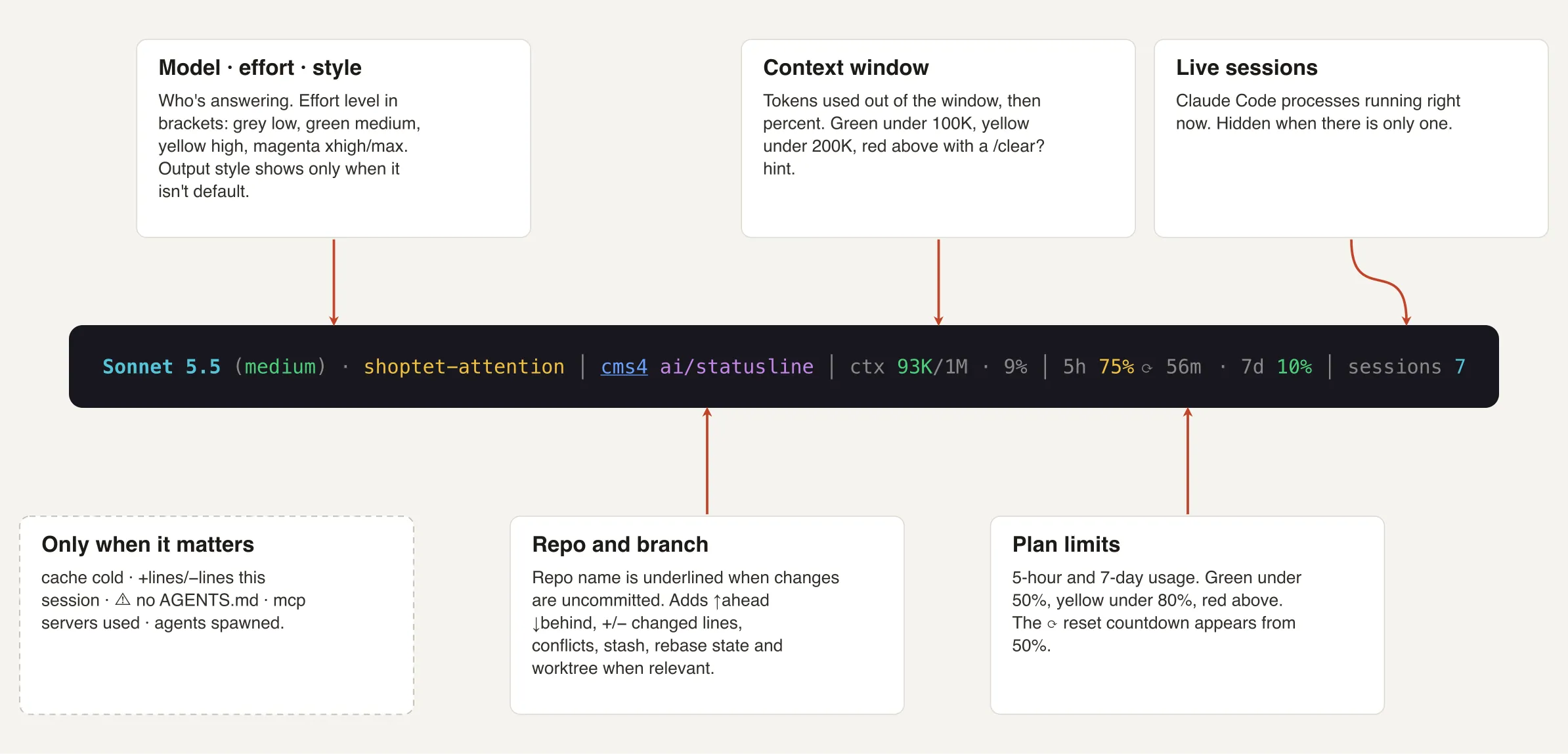
My Claude Code status line is one row, quiet by default. A segment shows only when it matters.
Setup
The status line is a command. Claude Code runs it, sends session JSON to stdin and shows whatever it prints. Two lines in ~/.claude/settings.json:
{
  "statusLine": {
    "type": "command",
    "command": "bash ~/.claude/statusline.sh"
  }
}
Or run /statusline and describe what you want. All fields are in the status line docs.
Always visible
- Model, effort, style: effort is coloured (grey low, green medium, yellow high, magenta xhigh/max); output style only when it is not the default
- Repo and branch: yellow
*for uncommitted changes,↑ahead↓behind,+/-changed lines, conflicts, stash, rebase or merge state - Context window: tokens out of the window, then percent; green under 100K, yellow under 200K, red above with a
/clear?hint - Plan limits: 5-hour and 7-day usage; green under 50%, yellow under 80%, red above, with a reset countdown
Only when it matters
- lines added and removed this session
cache coldwhen the prompt cache is not warm⚠ no AGENTS.mdwhen the project has nonemcpwith the number of MCP servers usedagentswith the number ofAgenttool calls in the sessionsessionswith the number of live Claude Code processes, when there is more than one
Reading the input
One jq call reads the session JSON. The separator is \x1f, not a tab: a tab is whitespace for IFS and would collapse empty fields.
input=$(cat)

IFS=$'\x1f' read -r model effort ctx pct size h5 h5r d7 d7r < <(echo "$input" | jq -r '[
  (.model.display_name // "?"),
  (.effort.level // ""),
  ((.context_window.current_usage.input_tokens // 0)
   + (.context_window.current_usage.cache_read_input_tokens // 0)
   + (.context_window.current_usage.cache_creation_input_tokens // 0)),
  (.context_window.used_percentage // "" | if . == "" then . else floor end),
  (.context_window.context_window_size // ""),
  (.rate_limits.five_hour.used_percentage // "" | if . == "" then . else floor end),
  (.rate_limits.five_hour.resets_at // ""),
  (.rate_limits.seven_day.used_percentage // "" | if . == "" then . else floor end),
  (.rate_limits.seven_day.resets_at // "")
] | map(tostring) | join("\u001f")')
Keep the // "" fallbacks, but not on booleans: false // "" is "", so a warm: false would never reach the script. rate_limits exists only for Pro and Max and only after the first API response, effort only for models that support it.
Colour by threshold
pctcolor() { # $1 percent → green <50, yellow <80, red ≥80
  if [ "$1" -ge 80 ]; then printf '%s' "$RED"; elif [ "$1" -ge 50 ]; then printf '%s' "$YEL"; else printf '%s' "$GRN"; fi
}
Context is coloured by tokens, not by percent.
Reset countdown
resets_at is Unix epoch seconds. One unit, one decimal: 3.9d, 1.5h, 45m.
resetin() {
  local s=$(( $1 - $(date +%s) )); [ "$s" -lt 0 ] && s=0
  awk -v s="$s" 'function f(x, u) { x = sprintf("%.1f", x); sub(/\.0$/, "", x); return x u }
    BEGIN { if (s >= 86400) print f(s / 86400, "d"); else if (s >= 3600) print f(s / 3600, "h"); else printf "%dm\n", s / 60 }'
}
Git status in one call
git status --porcelain=v2 --branch gives branch, ahead/behind and file states at once; awk counts them. --no-optional-locks keeps it from fighting with git commands running in the same repo.
git -C "$cwd" --no-optional-locks status --porcelain=v2 --branchClickable segments
An OSC 8 link is an escape sequence around the text. It works in iTerm2, Kitty and WezTerm.
printf '\033]8;;%s\a%s\033]8;;\a' "https://claude.ai/#settings/usage" "5h 75%"In mine, the repo opens the remote, the branch opens the folder, the limits open the usage page and the model opens its prompting guide.
Takeaway
The status line runs on every update, so keep it cheap and keep it quiet.
- show what changes your next decision (context, limits, branch)
- hide the rest until it is needed
- handle missing fields, they are missing at the start of every session